UI
Purpose
The v1 pain is invisibility: a case lives in one terminal, nobody else can watch, take over, or answer a gate (Platform Details PG-5). The UI is the one place where a case is visible to many, operated by one, and where every human decision the platform needs is asked and recorded. It is a section of serdica-ui administration, not a separate application — authentication, roles and deployment come with the host.
P The chat is the workspace (D119). A case is worked the way a coding assistant or a chat CLI is worked: one thread per case, in which the agent's steps, its tool calls, its questions, its plan and every human decision appear as cards in time order, and a person types into a composer at the bottom. Nothing about a case happens anywhere else — a decision taken outside the thread is invisible to the ledger and to the other viewers, which is v1's whole failure (PG-26). What makes it more than a chat is that every card says where it is about: environment · system · object, as a chip, so that a reader always knows what is where without opening a query.
P Two surfaces, one application. The operator surface is the administration section — eight workspaces behind role-dependent front doors (§ 1). The client surface is what the customer sees: their requests, one request in their own vocabulary, the acceptance gate their representative owns, and — as the target state — a self-service intake (§ 5b). Both are wireframed before build (PG-26):
| Surface | Wireframes | Workspaces / screens |
|---|---|---|
| Operator | ui/admin_wireframes.html |
Inbox · Cases (list · case chat · at a gate · where) · Decisions (queue · plan gate) · Studio (catalogue · version) · Knowledge · Metrics · Control (connectors · roles & policies · exceptions & kill switch) — fourteen screens |
| Client | ui/client_wireframes.html |
my requests · one request · acceptance · start a request (target state) — four screens |
Both files are self-contained HTML — open them in any browser. The screens are generated from one script (ui/gen_wireframes.py) so that every screen shares one shell, one palette and one vocabulary; amber marks a human decision, as in every diagram of this wiki, green a running or read-only thing, blue a parked thing, a link or the target state, red a refusal or failure.
0. Design principles
P Eight rules, in the order they were argued; every screen in § 5 can be checked against them.
| # | Principle | What it means on screen |
|---|---|---|
| U-1 | The chat is the workspace | a case is worked in one thread of cards; list screens only find and route; nothing is decided off-thread |
| U-2 | Every card says where | a locator chip ENV · SYSTEM · OBJECT (+ mode: read · write · ddl · send) on every tool call, write, decision and brief; the right rail Where is the sum of them |
| U-3 | A brief before a case | nothing arrives raw: platform.intake re-briefs every arrival from its source — with the source named and linked — and authorised intake opens automatically; one operator action corrects, merges or dismisses (H1, SG-11) |
| U-4 | Roles have front doors, not screens | one application; the role decides which workspaces exist in the rail and which buttons render. An Approver's door is Decisions; an Operator's is Inbox and Cases; a Prompt publisher's is Studio; an Administrator's is Control; the Customer representative has the client app |
| U-5 | Progressive disclosure | the thread shows a card's summary; the packet, the paper, the tool result and the full map are one click deeper and never inline. Result rows never appear in a chat or a paper |
| U-6 | CLI habits welcome | slash commands in the composer (/steer /answer /stop /handover /consult /park /resume /where /papers /try /help), a status line under the thread, keyboard navigation (j k Enter / g d g i g s ?) |
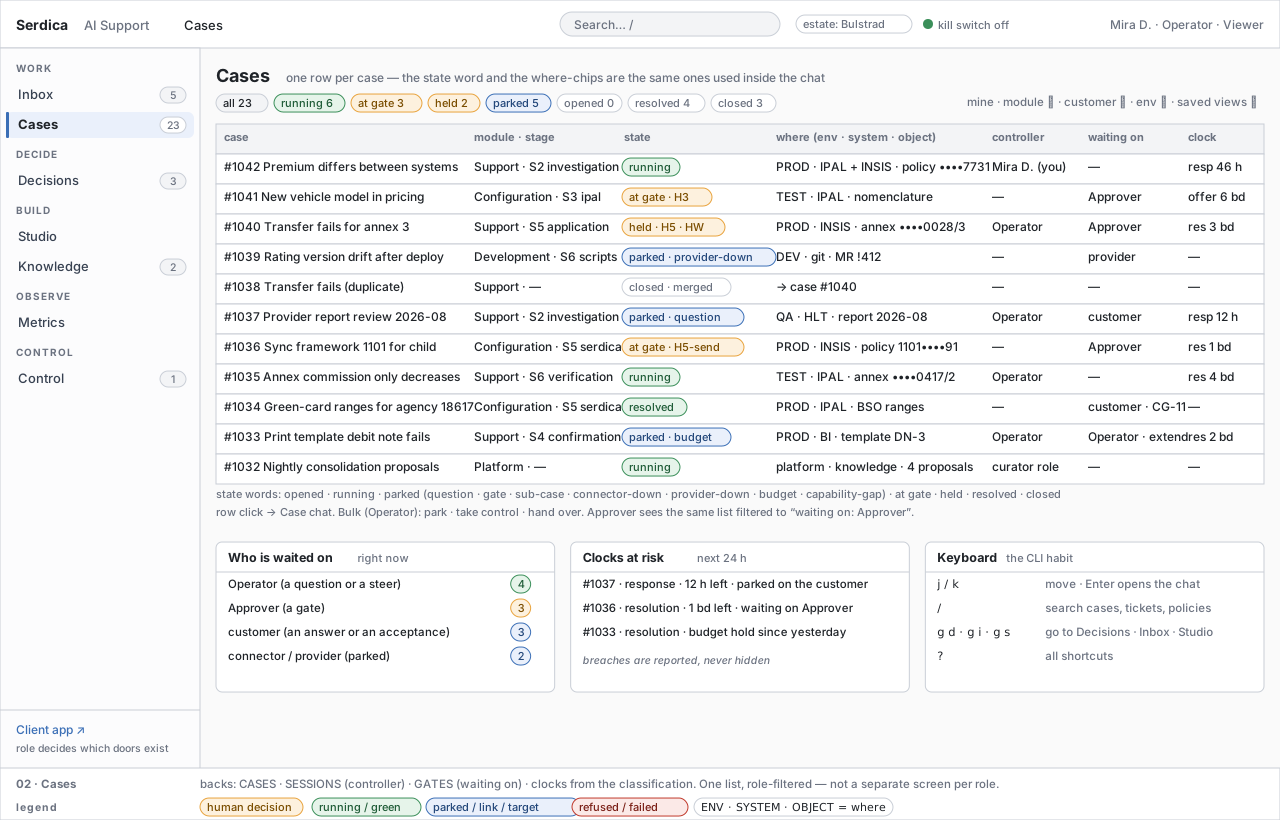
| U-7 | One vocabulary everywhere | the state words (opened · running · parked · at gate · held · resolved · closed), the gate kinds, the paper names and the where-chips are the same in the list, the thread, the queue and the footer of every wireframe |
| U-8 | The customer sees a different application | same case, customer words only; no transcript, no system names, no handles, no gate an operator owns; the client confirms business scope/results when assigned by case policy, and accepts the named preview or delivery; technical effect gates remain role-scoped |
1. Roles → front doors → workspaces
P The roles are those of Trust and Data § 3; the workspaces are the platform's, not a module's — a Support case and a Configuration case are worked in the same chat with a different stage ladder.
| Workspace | Rail group | Front door for | What it is for | Others who use it |
|---|---|---|---|---|
| Inbox (new, D119) | WORK | Operator | arrivals and automatically opened cases; inspect · correct & route · merge · dismiss | Viewer reads |
| Cases (formerly Sessions) | WORK | Operator | every case, its state, where it is, who controls it, what it waits on, its clocks; the case chat (formerly Session view) opens from here | Approver (filtered to waiting on: Approver), Viewer |
| Decisions (formerly Gate inbox; the prose still says "gate inbox" for the concept) | DECIDE | Approver | every waiting gate across all cases with its packet; held batches; write-shape training | Viewer reads; a shape proposal is answered at HW-approve by the Approver holding the target class (D133) |
| Studio (formerly Skills) | BUILD | Prompt publisher | prompts, skills and eval sets per module and stage; draft → eval → publish → rollback | a prompt's owner drafts and tries a draft on one case |
| Knowledge (formerly Memory) | BUILD | Operator with curator duty | the memory tree, the proposals queue, articles with their provenance; confirm · return · retire | every role reads |
| Metrics | OBSERVE | everyone | hours, gates, cases, versions — with each target's basis; nothing is edited here | — |
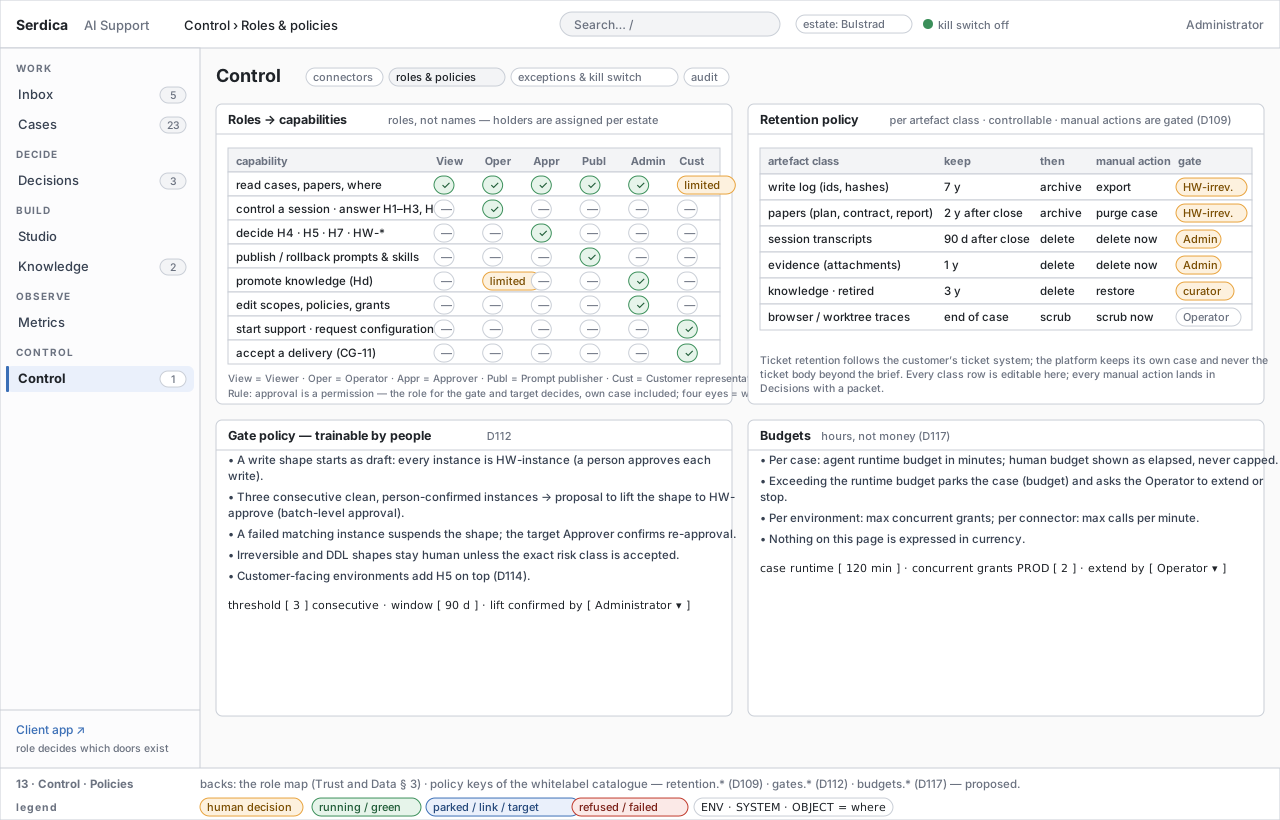
| Control (Connectors, plus two screens new in D119) | CONTROL | Administrator | connector scopes and health · roles & policies (retention, gate training, budgets) · exceptions & kill switch · audit | Approver reads exceptions |
| Client app | — | Customer representative | my requests · one request · acceptance · start a request | — |
2. The case chat — the vocabulary
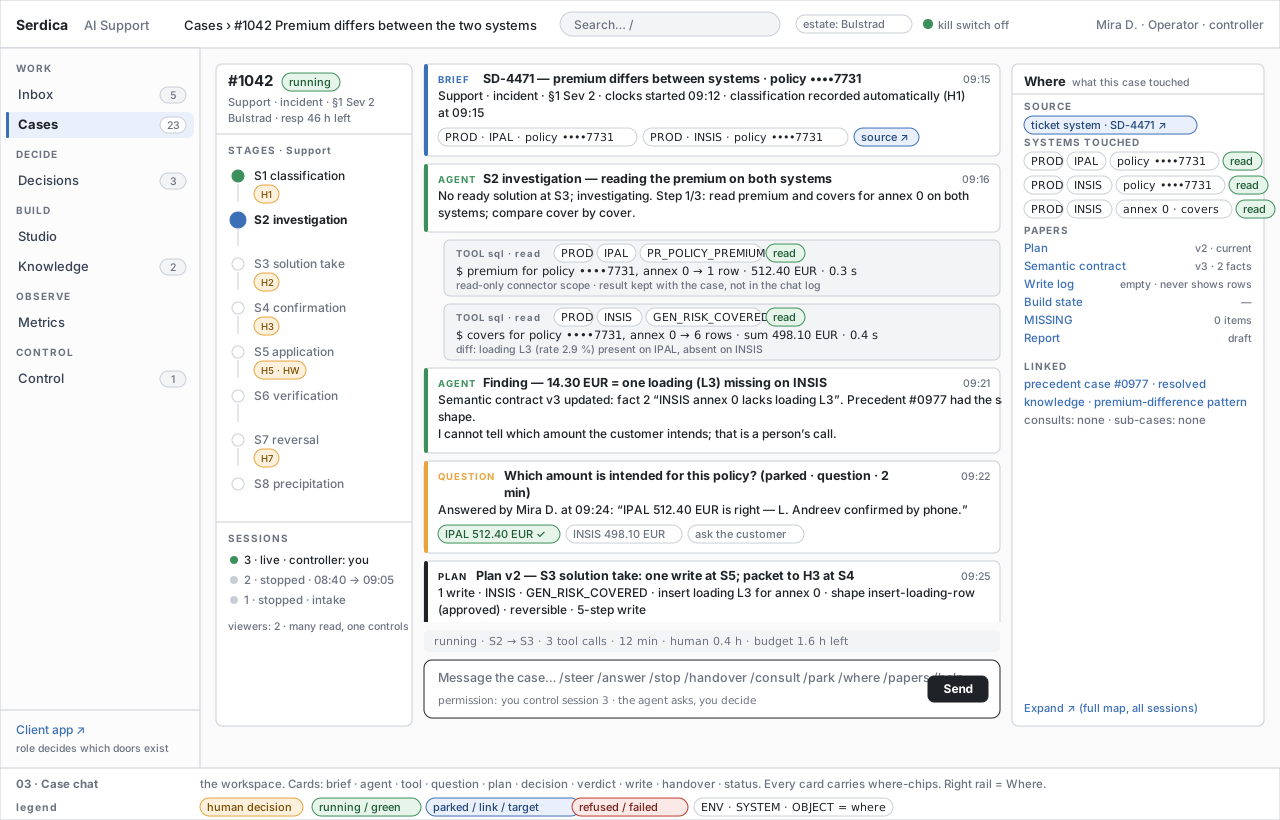
P Layout. Three columns. Left: the case header (id, state, type, contract class, clocks), the stage ladder of its module with the gate each stage carries, and the sessions (live · stopped · resumed) with the controller and the viewer count. Centre: the thread of cards, oldest first, a status line and the composer. Right: Where — source, systems touched with mode, papers, linked cases and knowledge, and — when the case is at a gate — the grant that an approval would issue.
P Card kinds. Eleven; the left colour bar names the kind, the small caps label repeats it for the colour-blind.
| Card | Who writes it | Carries | One click deeper |
|---|---|---|---|
| brief | platform.intake |
the normalised arrival, source chip, classification, clocks, where-chips of every resolved handle | the source (ticket, mail, help-desk item), the full brief |
| agent | the stage's agent | a step or a finding with its stated reasoning — never chain-of-thought (Architecture § 1) | the paper it updated (plan, semantic contract, MISSING) |
| tool | the runtime | tool name · mode · where-chip · one-line result summary (counts, sums, timing) | the result kept with the case — never rows in the thread |
| question | the agent | a question only a person can answer; parks the task as question (D66) |
the answer options; answering resumes |
| plan | the agent | the plan version, the writes it will need and their shapes, the verification it promises | the Plan paper; the packet preview |
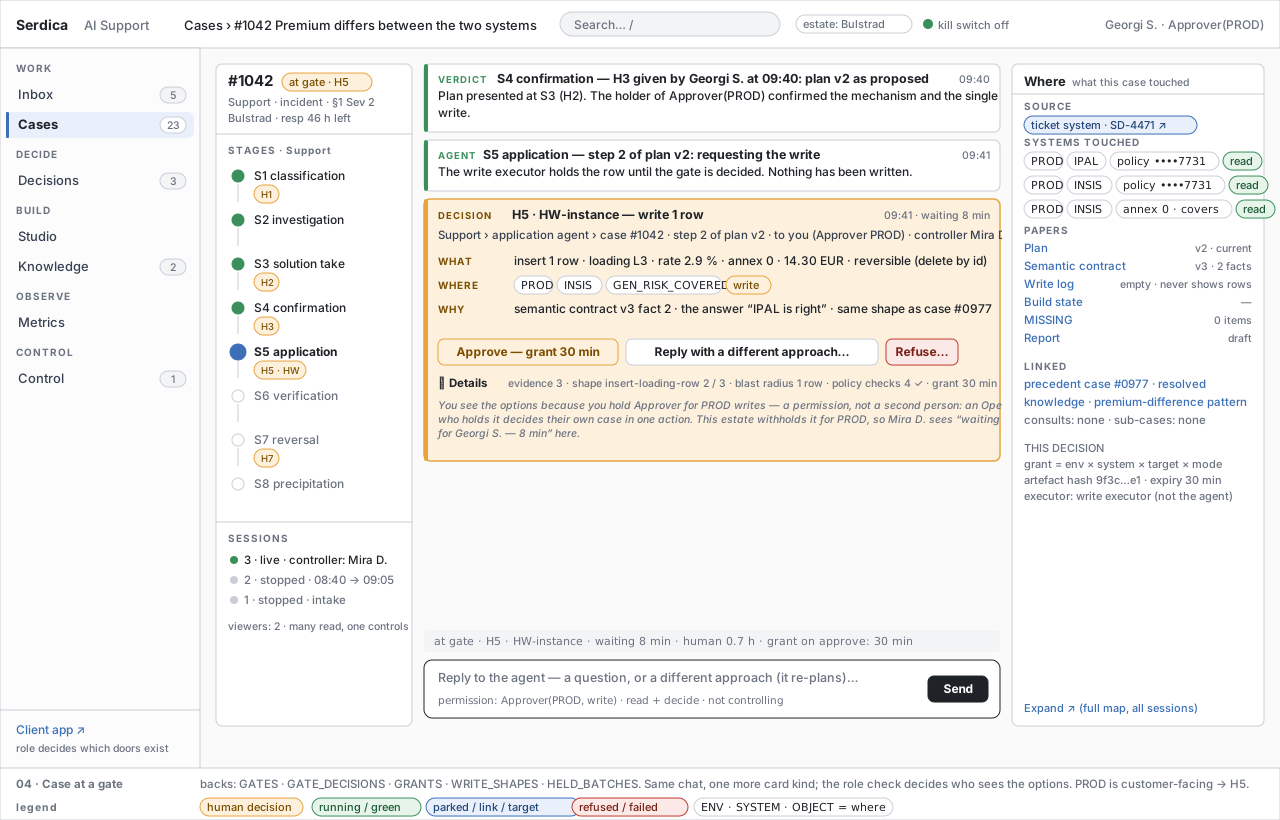
| decision | the runtime at a gate | who proposes what to whom — module › agent › case · step of the plan · the role it waits on — then one line each of what · where · why, and the options for the role that holds the gate: approve · reply with a different approach (the agent re-plans) · refuse; evidence, shape, reversibility, blast radius and policy checks sit under Details; everyone else sees waiting for ⟨person · role⟩ | the plan gate (screen 07) |
| verdict | a person | the recorded decision: gate, outcome, role, reason, time | the GATE_DECISIONS row |
| write | the write executor | the executed write under its grant: ids and counts, the 5-step progress (show → apply uncommitted → verify in DB → replay the UI query → COMMIT last), the verify step it triggered | the Write log paper (ids and hashes, never rows) |
| handover · consult | the runtime | a sub-case opened in another module (Hd) or a consult answered read-only | the sub-case's own chat |
| status | the runtime | park and resume with the park class, connector or provider down, budget reached, kill switch, session stop or resume | Control › Exceptions |
| human | any person with a role | a message, a steer, an answer — always attributed to a role and a session | — |
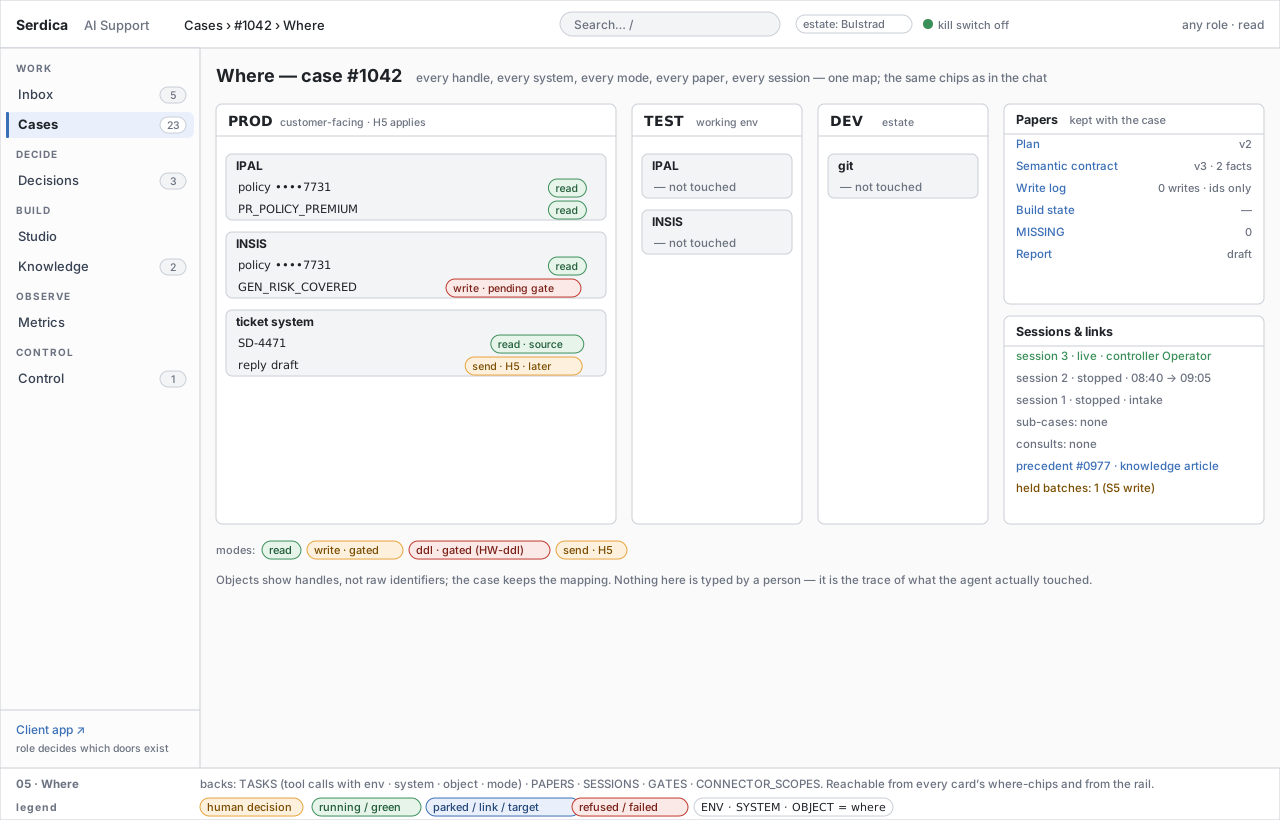
P Where-chips. ENV · SYSTEM · OBJECT in monospace, followed by a mode chip: read (green), write or send (amber — gated), ddl (red — HW-ddl). Objects are handles (policy ••••7731, annex ••••0028/3), never raw identifiers; the case keeps the mapping (Trust and Data § 4). Clicking any chip opens Where (screen 05): the full map by environment, system and mode of everything the case touched — the trace of what the agent actually did, typed by nobody.
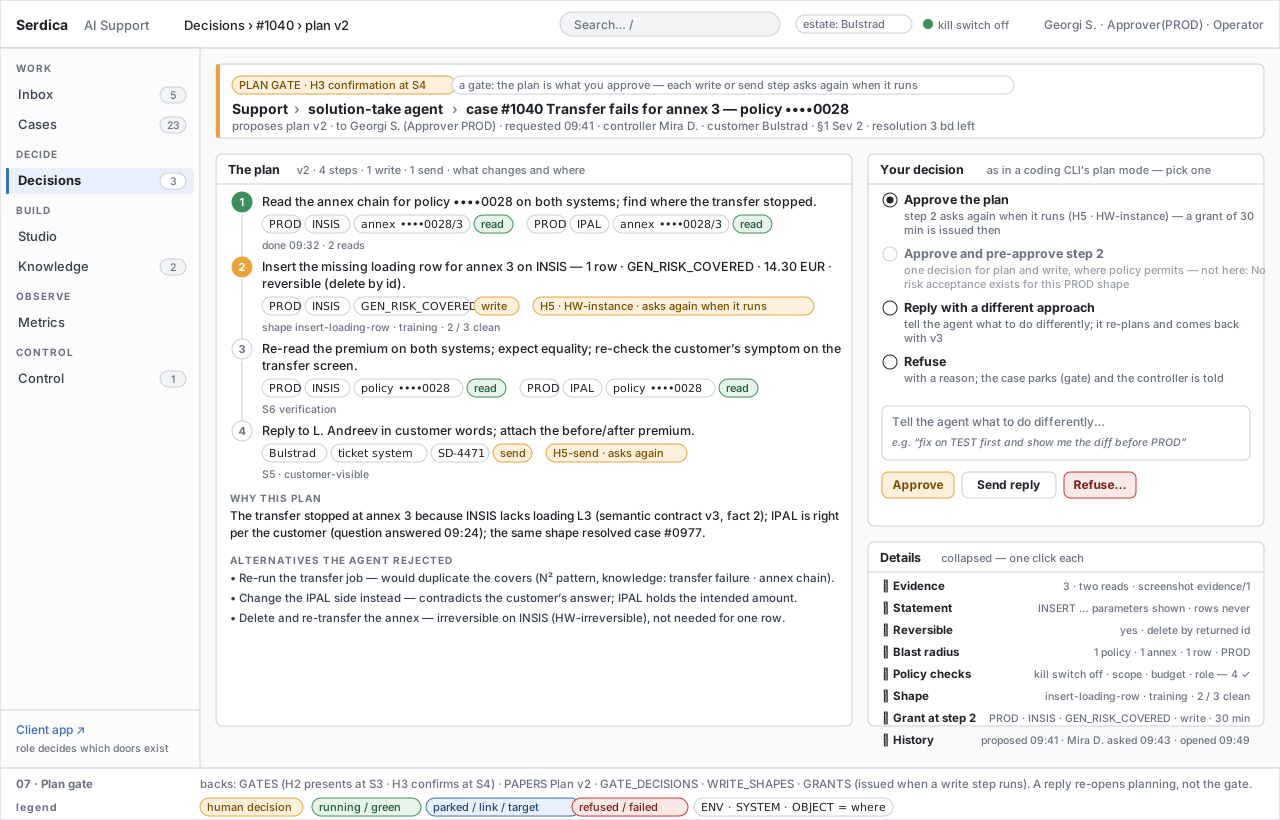
P The plan gate follows the plan mode of the coding CLIs. The agent proposes a numbered plan — each step with its where-chips and the gate it will need — states why, and lists the alternatives it rejected. The person picks one of four: approve the plan (a write or send step asks again when it runs, and the grant is issued then); approve and pre-approve a step — one decision for plan and write where policy permits, and shown disabled with the reason where it does not (an approved shape, not irreversible, and never H5 on a customer-facing environment); reply with a different approach — free text to the agent, which re-plans and returns with the next plan version; refuse with a reason, which parks the case. A reply re-opens planning, not the gate. Evidence, the statement, reversibility, blast radius, policy checks, the shape's training count and the grant are one click deeper under Details.
P Composer and permission mode. The composer's second line always states the permission the typist has: you control session 3 · the agent asks, you decide for the controller; Approver(PROD, write) · read + decide for a role holder who is not controlling; viewers have no composer. Slash commands: /steer ⟨text⟩ (a steer to the running agent) · /answer (the open question) · /stop and /resume (the session) · /handover ⟨module⟩ (opens Hd) · /consult ⟨node⟩ (a read-only consult) · /park ⟨reason⟩ · /where and /papers (open the rail sections) · /try ⟨version⟩ (run this case on a draft prompt — how prompts are trained case by case, § 4 W9) · /help.
P Status line. State · stage → next stage · tool calls · elapsed · human minutes so far · runtime budget left (minutes). Hours and minutes only (D117); nothing on any screen is expressed in currency.
3. Intake — a brief before a case
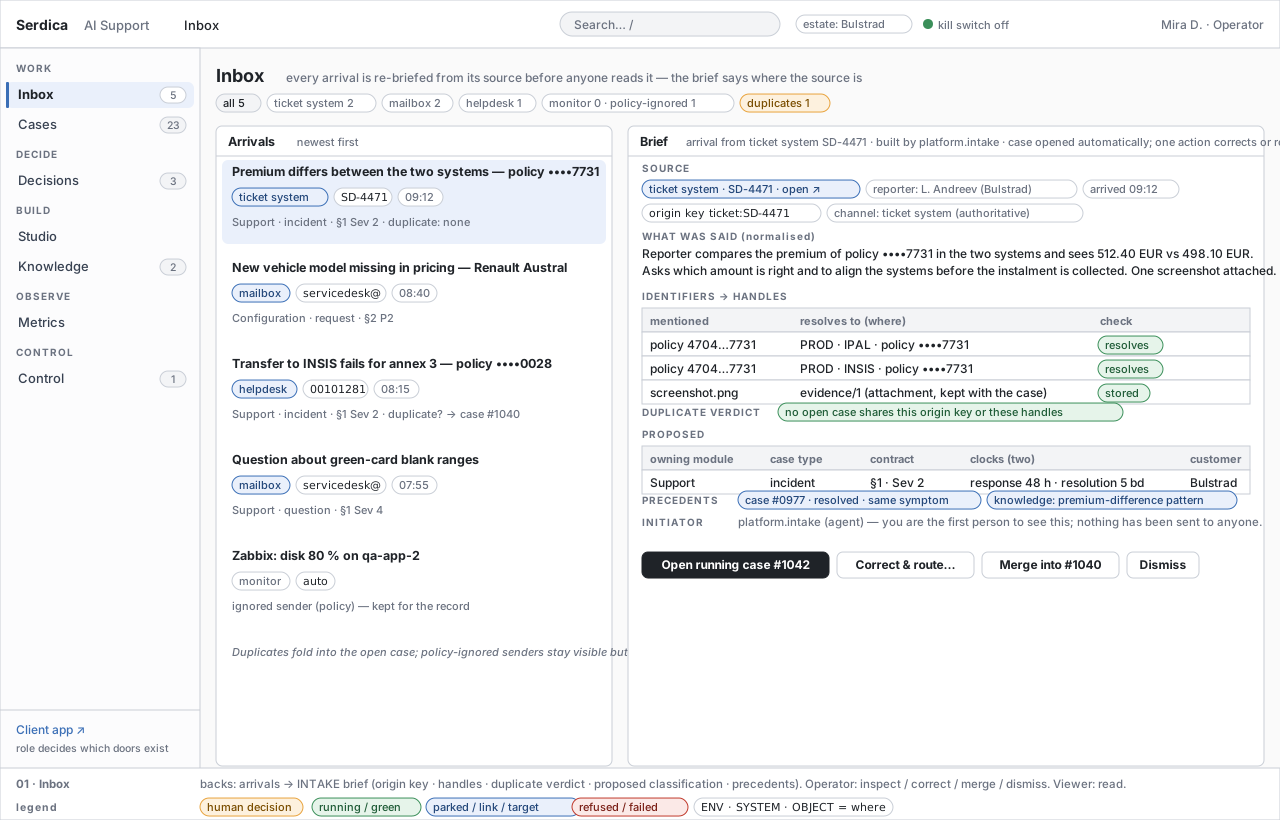
P The Inbox is the first screen an Operator opens, and nothing in it is raw. An arrival from any door — the ticket system, the shared mailbox, the customer's help desk, the client app's Start a request, a monitor — is normalised by platform.intake (Agents § 5c, Stage Classification § 4) into a brief:
| Field | Content | Shown as |
|---|---|---|
| source | channel, external id, link, reporter, arrival time, origin key (channel + external id, D98) | a blue source chip that opens the original |
| what was said | the normalised statement of the arrival — not the raw body | two to four lines |
| identifiers → handles | every policy, annex, agency, ticket, attachment the arrival mentions, resolved to a where-chip and checked | a small table with a green resolves or a red not found |
| duplicate verdict | whether an open case shares the origin key or a handle | a chip; merge into #… is offered when it does |
| proposed | owning module · case type · contract section and severity or priority · the two clocks · customer | a one-row table — the classification is auto by design (SG-11) |
| precedents | closed cases and active knowledge that match the symptom | blue chips that open them |
| initiator | who started it — a channel, a person on the client app (D97) — and the fact that no person has yet seen it | one line |
P Authorised intake opens automatically and records its H1 decision; clocks run from arrival. The operator may Open case, Correct & route (a revision and evaluation example), Merge into #… after confirming the same source request, or Dismiss policy noise. Missing initiation authority waits visibly. A shared policy handle alone does not make two different requests duplicates.
4. Workflows
P Thirteen workflows; each names its trigger, its actors, the screens it crosses and where it ends. Together they cover every human action the platform asks for — anything not listed here is either the agent's own work or a defect of this page.
| # | Workflow | Trigger | Actors | Screens | Steps | Ends in |
|---|---|---|---|---|---|---|
| W1 | Intake and brief | an arrival on any door | platform.intake, Operator |
Inbox → Case chat | normalise · resolve handles · dedup · authorised case opens · classify · precedents; Operator inspects / corrects / merges / dismisses | a case at S1 with clocks from arrival; or an explicit authority wait |
| W2 | Follow a case | anyone opens a case | Viewer, any role | Cases → Case chat → Where | read the thread as it grows (realtime); open a card one level deeper; open Where | nothing changes; many read, one controls |
| W3 | Steer, answer, stop | a running case | Operator (controller) | Case chat | /steer; answer a question card (park question → resume); /stop and /resume a session; Take over (needs Operator, notifies the previous controller) and Hand over (recorded) |
the case continues under one controller |
| W4 | Decide a gate | a decision card appears | the holder of the role for this gate and target | Decisions → Case at a gate → Plan gate | read who proposes what; Approve → for a plan, H3; for a write, a grant env × system × target × mode bound to the artefact hash, with expiry; Approve and pre-approve a step where policy permits; Reply with a different approach → the agent re-plans and returns with the next plan version; Refuse with reason → park gate |
a verdict card; on an approved write, the executor runs (W6) |
| W5 | Train a shape | a clean, person-confirmed write instance | Approver | Packet › Shape · Decisions › Shapes · Control › Policies | each HW-instance verdict counts; three consecutive clean instances propose lifting the shape to HW-approve (D112); the Approver for the target class confirms at HW-approve (D133); any refusal or failed verify resets; any Approver may suspend |
a shape in draft · approved · suspended; H5, HW-shared, HW-irreversible, HW-ddl never lift |
| W6 | Apply, verify, reply | an approved write or send | write executor, agent, Approver | Case chat | the executor applies under the grant (5-step write) → write card with ids; S6 re-checks the customer's symptom on both systems; the reply is drafted in customer words → H5-send on a customer-facing environment (D114) → sent; a configuration delivery asks the customer to accept (CG-11, W12); held batches wait as cases of their own until released, refused or split | resolved · closed; or S7 reversal (H7) |
| W7 | Hand over, consult, sub-case | the plan needs another module or another node's knowledge | Operator, receiving module | Case chat → sub-case chat | /handover ⟨module⟩ opens Hd (always human, prior confirmation); the receiving root accepts (a sub-case with its own ladder and gates inside the same case) or rejects with a reason (D66); /consult ⟨node⟩ is read-only and returns an answer card |
a handover card; Where lists the sub-case |
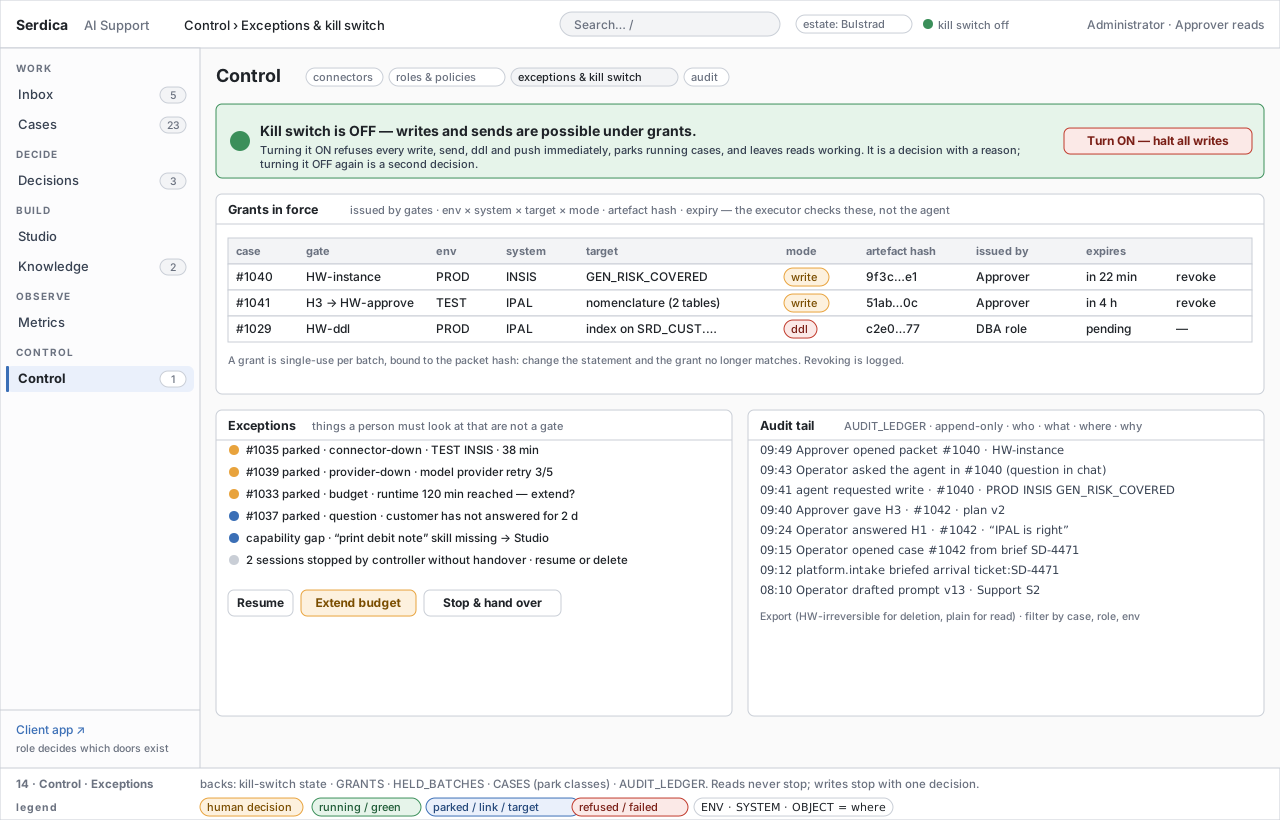
| W8 | Park, recover, kill | a connector or provider fails, a budget is reached, a question waits, the estate must stop | runtime, Operator, Administrator | Case chat (status cards) · Control › Exceptions | parks name one class (question · gate · sub-case · connector-down · provider-down · budget · capability-gap); connector-down resumes when the probe is green; budget asks extend or stop; the kill switch refuses every write, send, ddl and push at once and parks running cases — reads continue; turning it off is a second decision | resumed cases; or a stopped estate with readable papers |
| W9 | Author and publish | a prompt, skill or eval set needs to change | the prompt's owner (author), Prompt publisher | Studio → Studio version → (Case chat /try) |
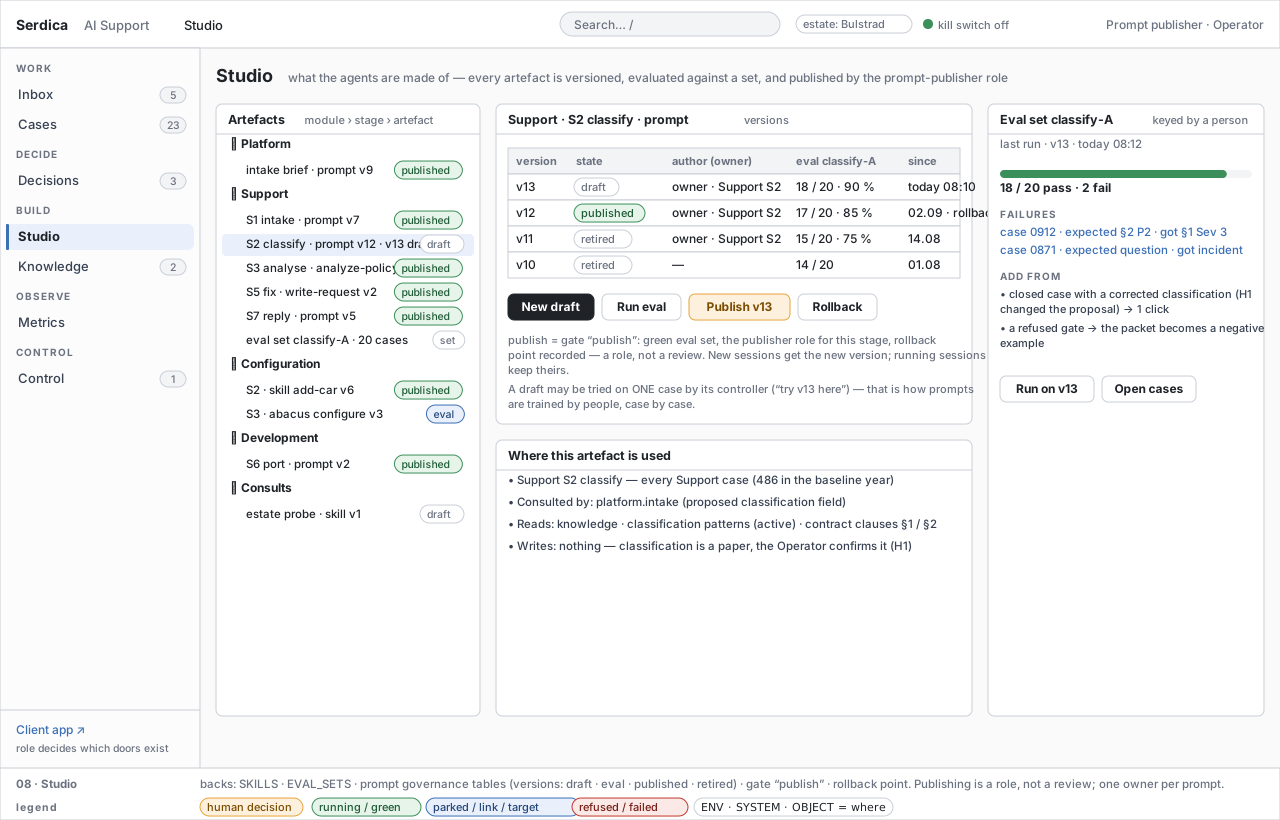
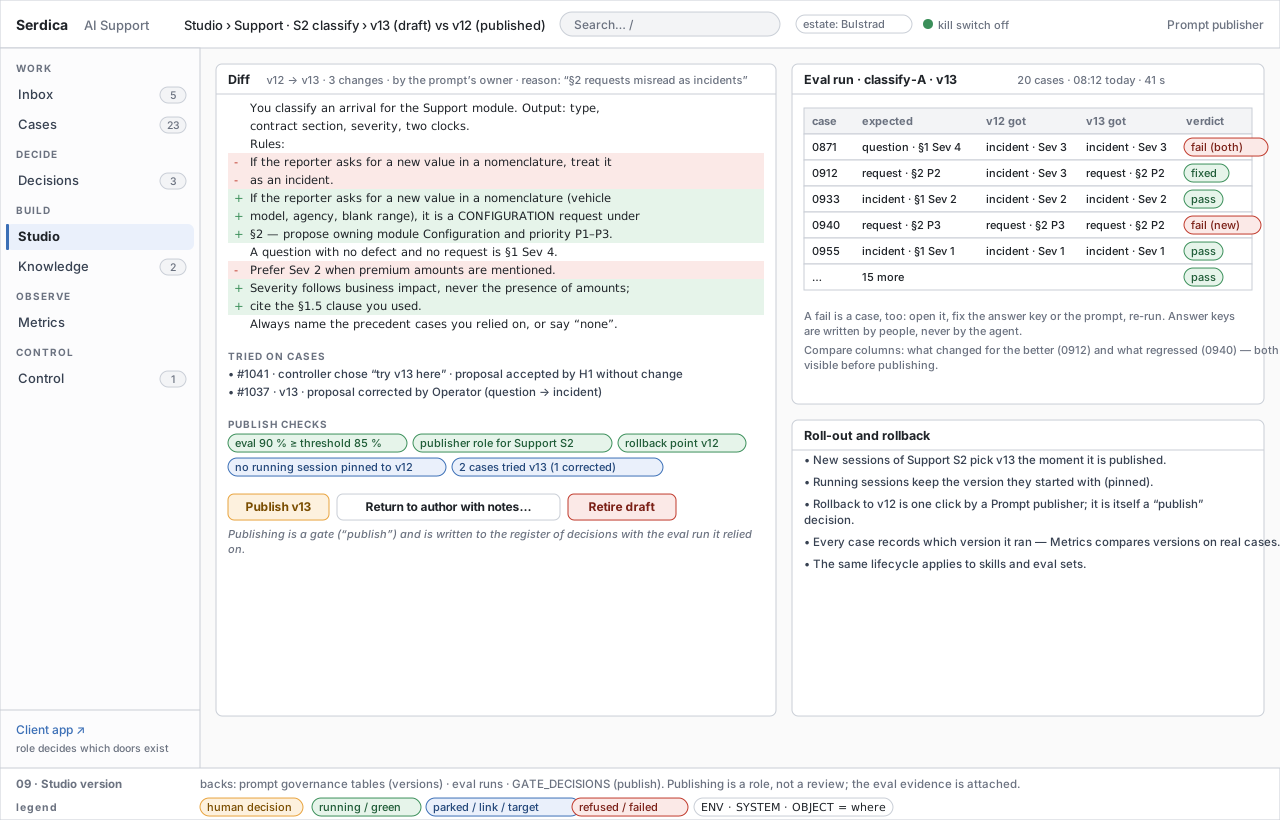
the owner drafts with a reason → tries it on one case (/try v13) → runs the eval set → compares v12 / v13 per case → publish (a gate: green eval set, the publisher role for this stage, rollback point recorded — a role, not a review) → new sessions get the version, running ones stay pinned → rollback is itself a publish |
a published version; eval failures become cases |
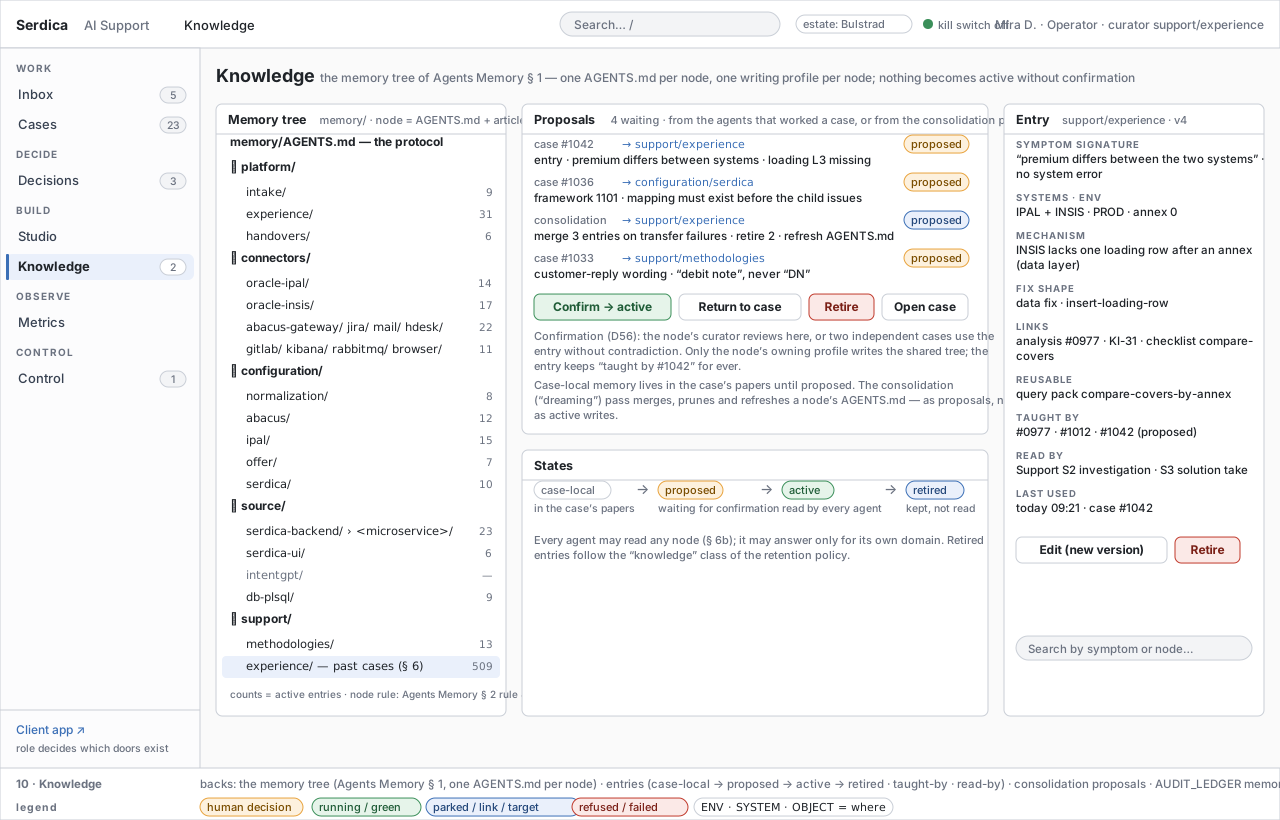
| W10 | Curate knowledge | a case closes with a proposal; the nightly consolidation pass proposes | agent, curator (an Operator with the duty for a branch) | Knowledge | case-local finding → proposed → confirmation (D56): a curator's review, or two independent cases used it without contradiction → active (read by agents) → retired per the retention class; the consolidation ("dreaming") pass only proposes | an article that names the cases that taught it |
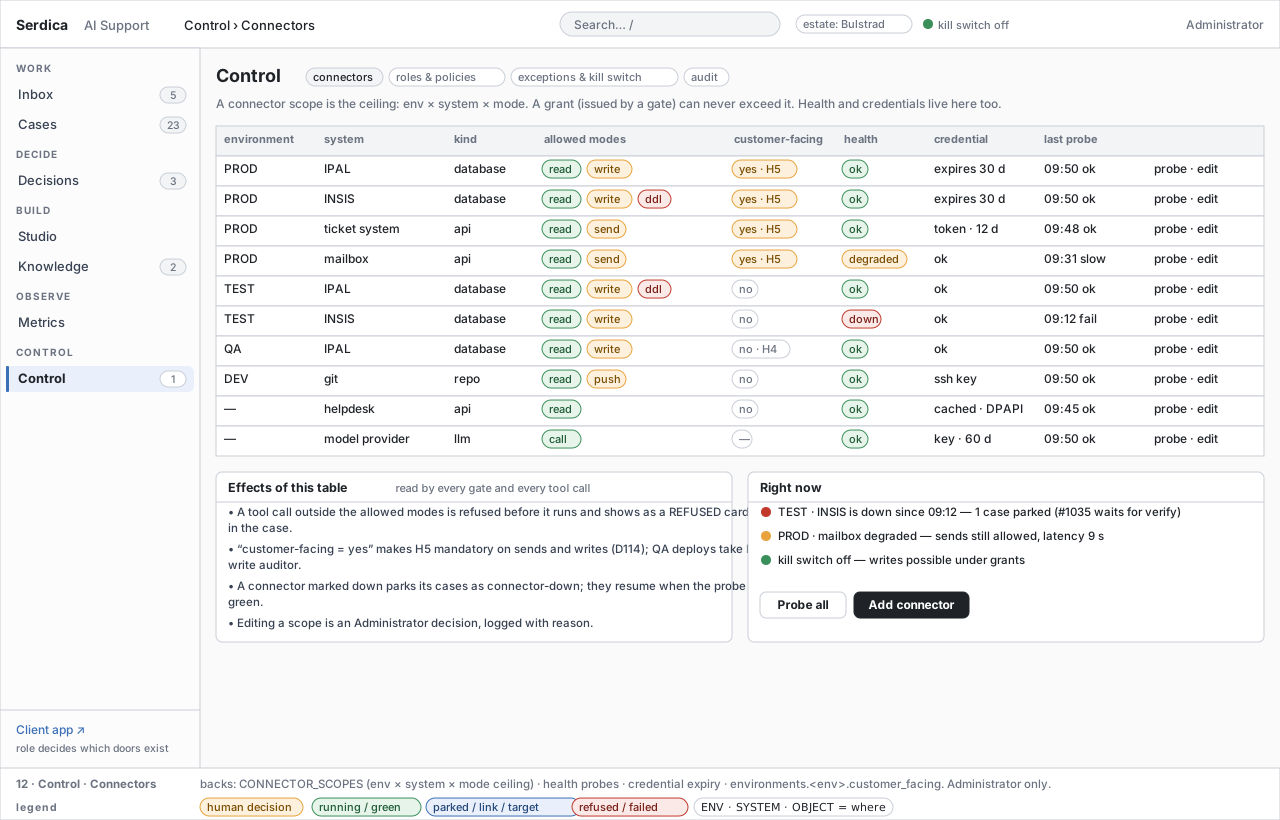
| W11 | Administer | a scope, role, policy or budget must change | Administrator | Control › Connectors · Roles & policies · Exceptions | edit a connector scope (the ceiling a grant can never exceed) · probe · mark customer-facing; the roles → capabilities matrix (roles, not names — D107, D110); retention per artefact class with gated manual actions (D109); gate policy thresholds (D112); budgets in minutes (D117); every change lands in AUDIT_LEDGER with a reason | a policy row; a decision in the audit |
| W12 | The customer's journey | a customer starts or is written to | Customer representative | Client app: Start a request → My requests → One request → Acceptance | start (kind · words · references resolved · attachments · urgency as a proposal) or arrive by any channel → brief (W1) → follow in plain words → answer the one question we cannot answer for them → Accept (CG-11, recorded with name and artefact hash) or Ask for changes (re-opens); a representative whose role set includes Viewer may open the case view — the operator thread, read-only, handles instead of identifiers | done; or re-opened with the customer's note |
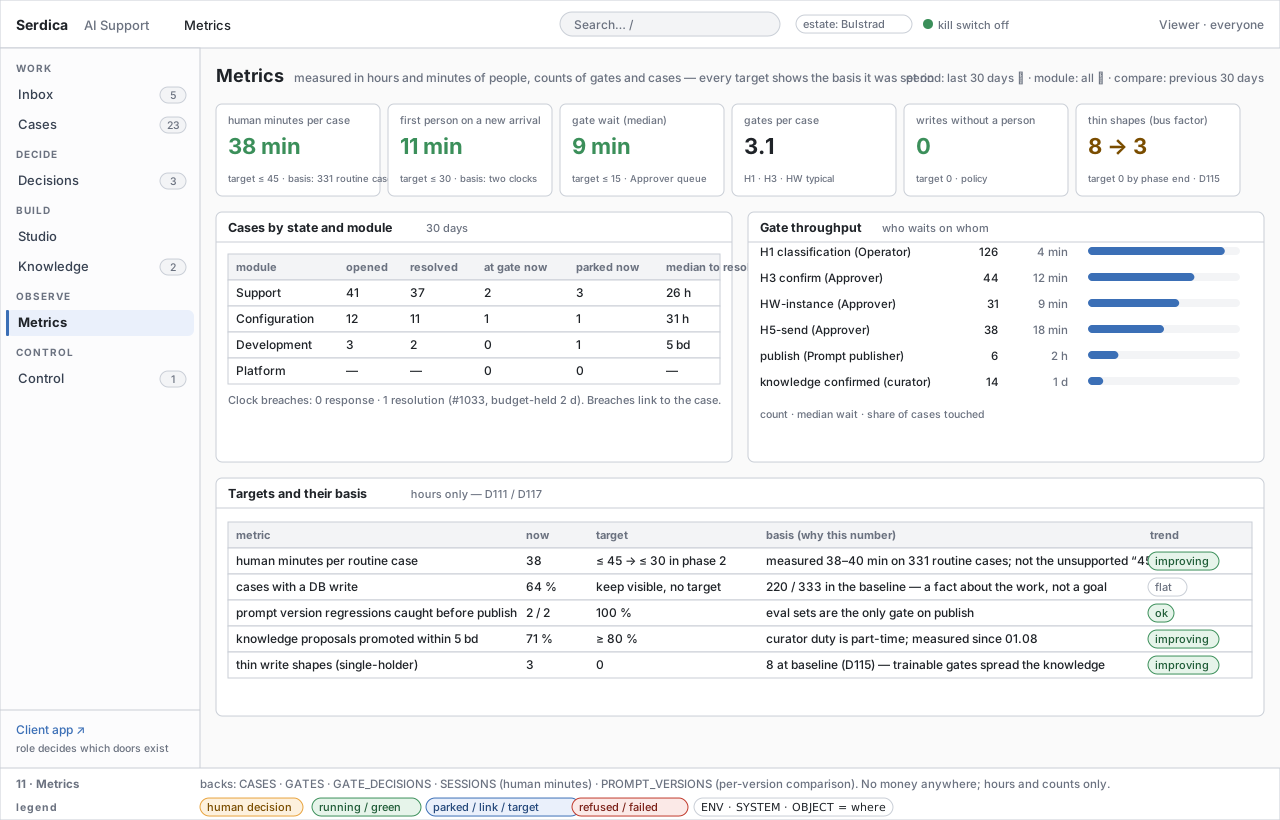
| W13 | Observe | any time | everyone | Metrics | read human minutes per case, first-person time, gate waits, cases by state and module, targets with their basis (D111); breaches link to the case | nothing is edited; a target is a claim with a basis |
P Three properties hold across all thirteen: every human action is a verdict or a human card in some case's thread (or a row in AUDIT_LEDGER for Control), so nothing is decided off-record; every workflow that changes an environment passes through a grant issued by a gate and executed by the write executor, never by the agent; and every workflow is role-checked by the front door, not by a hidden button.
5. Screen inventory
P Case content and response path. The 68 case journeys bind the existing screens to backend and agent work. One request uses its existing question/action card for external work: who must act, a plain-language instruction, when requested, the evidence needed, Report completed, Cannot perform and Add evidence. Reporting calls the scoped response API, not the acceptance API, and changes the display to “Checking your result”. An ordinary business answer uses the same API with response_kind=answer. A required action still waiting is waiting_for_you; an external organisation waiting is in_progress with the waiting party and age stated in the summary. Cases and Where show the full obligation/member matrix; Acceptance states instructions, preview or delivery scope. No new screen or client-visible technical transcript is introduced.
5a. The operator surface
| # | Screen | Renders | Backed by | Who acts, how |
|---|---|---|---|---|
| 01 | Inbox | arrivals newest first with source, time and proposed classification; the selected brief (§ 3) | arrivals → intake briefs (origin key, handles, duplicate verdict, classification, precedents) | Operator: open existing case · correct & route · merge · dismiss; automatic H1 is already recorded |
| 02 | Cases | one row per case: id and title, module · stage, state chip, where chips, controller, waiting on, clock; who is waited on, clocks at risk, keyboard | CASES ⋈ SESSIONS ⋈ GATES ⋈ the classification's clocks |
Operator: open, park, take control, hand over; Approver: same list filtered to waiting on: Approver |
| 03 | Case chat | the thread of cards, the stage ladder with gates, the sessions, the status line, the composer, the Where rail (§ 2) | ledger events over SignalR; TASKS; PAPERS; GATES |
controller steers, answers, stops; everyone reads |
| 04 | Case at a gate | the same chat with a decision card carrying the packet and the buttons for the holding role; waiting for Approver for everyone else | GATES, GATE_DECISIONS, GRANTS, WRITE_SHAPES, HELD_BATCHES |
the holder of Approver for this target: approve · refuse · ask |
| 05 | Where | the full map: environments as columns, systems as boxes, objects with mode chips; papers; sessions; sub-cases, consults, precedents, held batches | TASKS (env · system · object · mode per tool call), PAPERS, SESSIONS, CONNECTOR_SCOPES |
read only; reached from any where-chip |
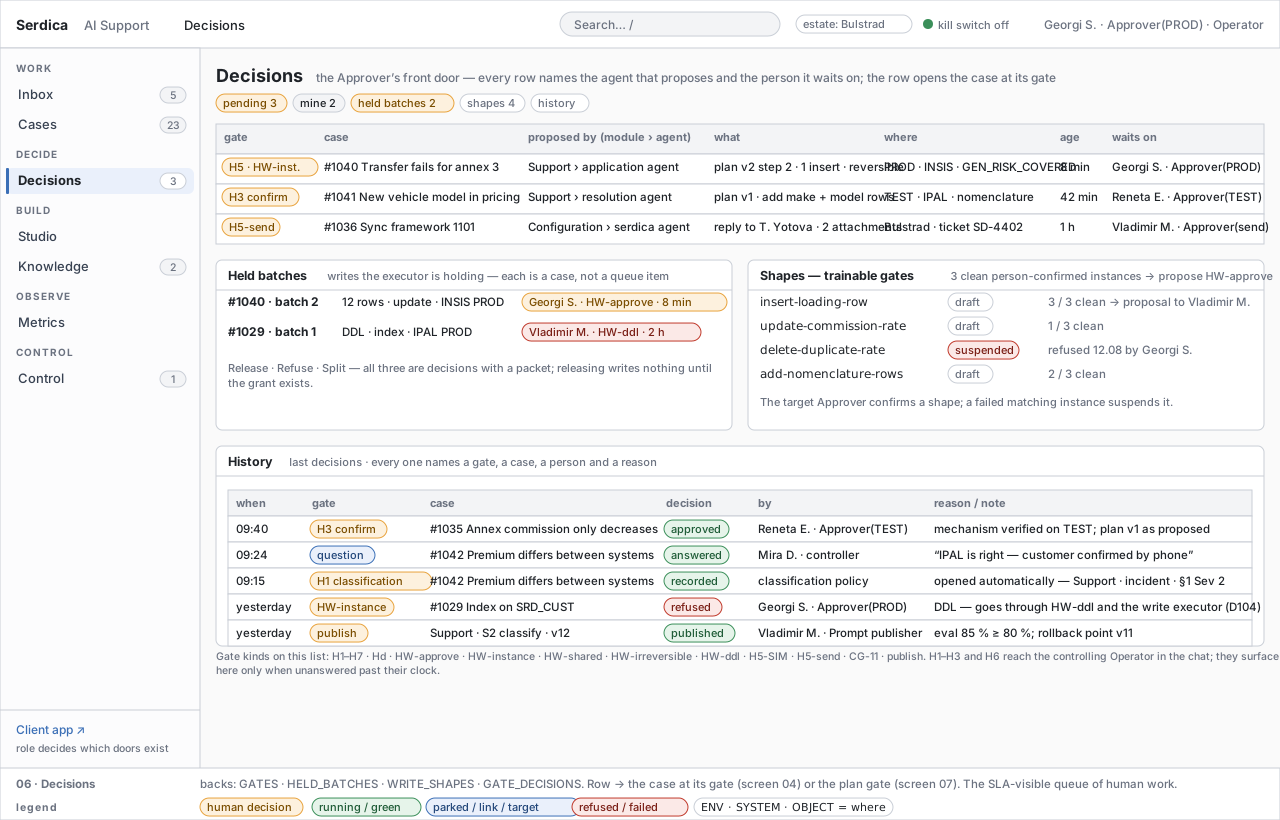
| 06 | Decisions | every waiting gate: kind, case, proposed by (module › agent), what, where, age, waits on (person · role); held batches; shapes with their clean-instance count; history of decisions with the person, the role and the reason | GATES, HELD_BATCHES, WRITE_SHAPES, GATE_DECISIONS |
Approver: row → the case at its gate or the plan gate; release · refuse · split a held batch; the Approver for the target class: confirm a shape proposal at HW-approve (D133) |
| 07 | Plan gate | header: module › agent › case · proposes plan vN · to whom · controller · customer · clocks; the plan as numbered steps, each with where-chips and the gate it needs, done/now/next; why this plan; the alternatives the agent rejected; your decision — approve · approve and pre-approve a step (disabled with the reason where policy forbids) · reply with a different approach · refuse; Details collapsed: evidence, statement, reversibility, blast radius, policy checks, shape, grant, history | GATES (H2 presents at S3, H3 confirms at S4), the Plan paper, GATE_DECISIONS, WRITE_SHAPES, GRANTS (issued when a write step runs) |
the holder of the role: approve · reply · refuse |
| 08 | Studio | artefacts by module › stage (prompts, skills, eval sets) with state; the selected artefact's versions with eval results; where it is used; the eval set with its failures | SKILLS, EVAL_SETS, prompt governance tables (Agent Framework § 6) |
the prompt's owner: new draft, run eval; Prompt publisher: publish, rollback |
| 09 | Studio version | the diff between the draft and the published version; cases it was tried on; publish checks; the eval run per case (expected · old · new · verdict); roll-out and rollback rules | prompt governance tables, eval runs, GATE_DECISIONS (publish) |
Prompt publisher: publish · return to author · retire draft |
| 10 | Knowledge | the memory tree of Agents Memory § 1 — platform/ (intake · experience · handovers), connectors/<system>, configuration/ (normalization · abacus · ipal · offer · serdica), source/ (serdica-backend › microservices · serdica-ui · intentgpt · db-plsql), support/ (methodologies · experience) — one AGENTS.md per node with active-entry counts; the proposals queue with source case and target node; the state ribbon (case-local → proposed → active → retired); one experience entry (symptom signature · systems/env · mechanism · fix shape · links · reusable artefacts · taught by · read by); search by symptom |
the memory tree, entries, consolidation-pass proposals, AUDIT_LEDGER memory events |
the node's curator: confirm → active · return · retire · edit as a new version |
| 11 | Metrics | tiles (human minutes per case, first person on an arrival, gate wait, gates per case, writes without a person, thin shapes); cases by state and module; gate throughput; targets with their basis | ledger parsers (Metrics) | read only |
| 12 | Control › Connectors | env × system × kind × allowed modes × customer-facing × health × credential × last probe; effects; what is down right now | CONNECTOR_SCOPES, health probes, environments.<env>.customer_facing |
Administrator: probe · edit scope · add connector |
| 13 | Control › Roles & policies | roles → capabilities matrix; retention policy per artefact class (keep · then · manual action · gate); gate policy (threshold · window · confirmer); budgets in minutes | the role map (Trust and Data § 3); the catalogue rows retention.per_class (D109), gates.auto_confirm and gates.escalation_intervals (D112) and budget.* (D117) — Whitelabel Catalogue § 5 |
Administrator edits; manual retention actions land in Decisions with a packet |
| 14 | Control › Exceptions & kill switch | the kill switch with its state and consequence; grants in force (case · gate · env · system · target · mode · hash · issued by · expires); exceptions (parked cases by class, capability gaps, orphaned sessions); the audit tail | kill-switch state, GRANTS, HELD_BATCHES, CASES (park classes), AUDIT_LEDGER |
Administrator: turn on / off (two decisions), revoke a grant, resume · extend · stop & hand over |
5b. The client surface
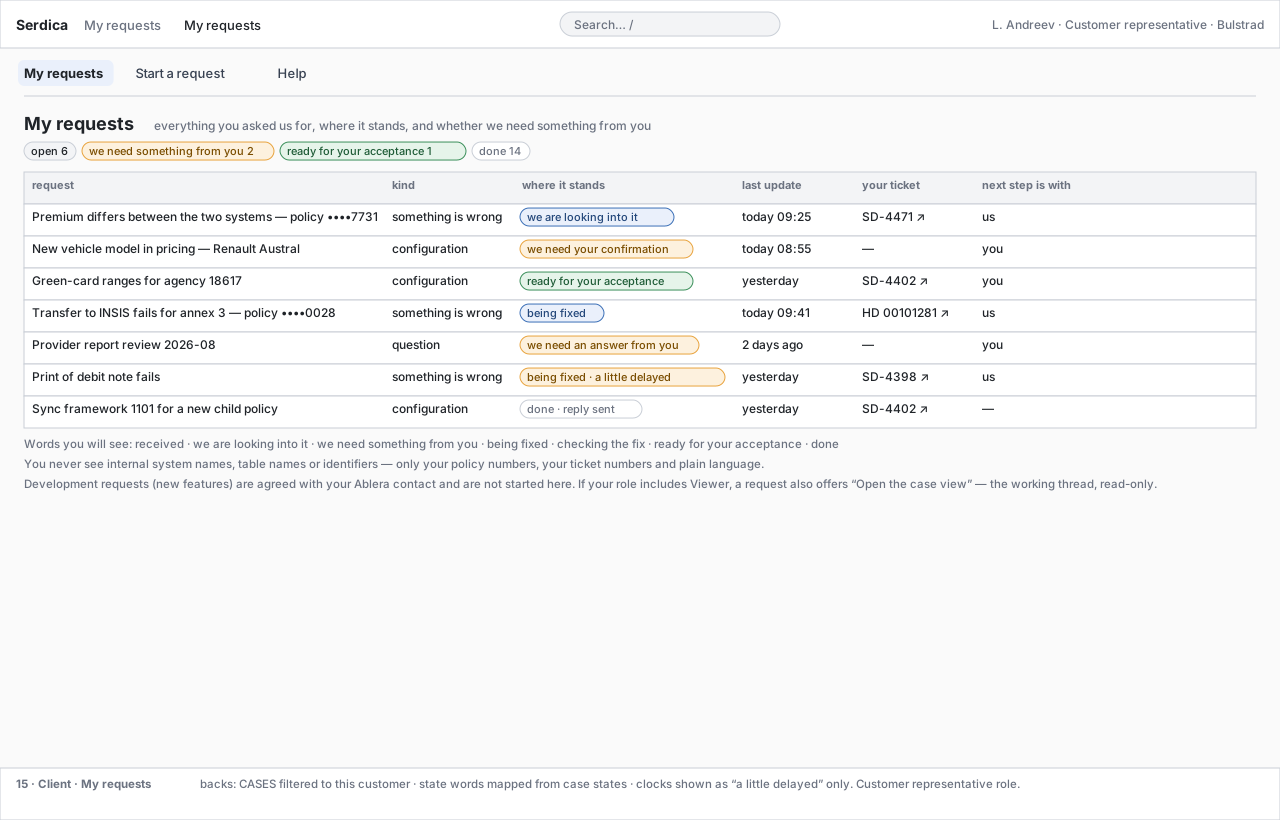
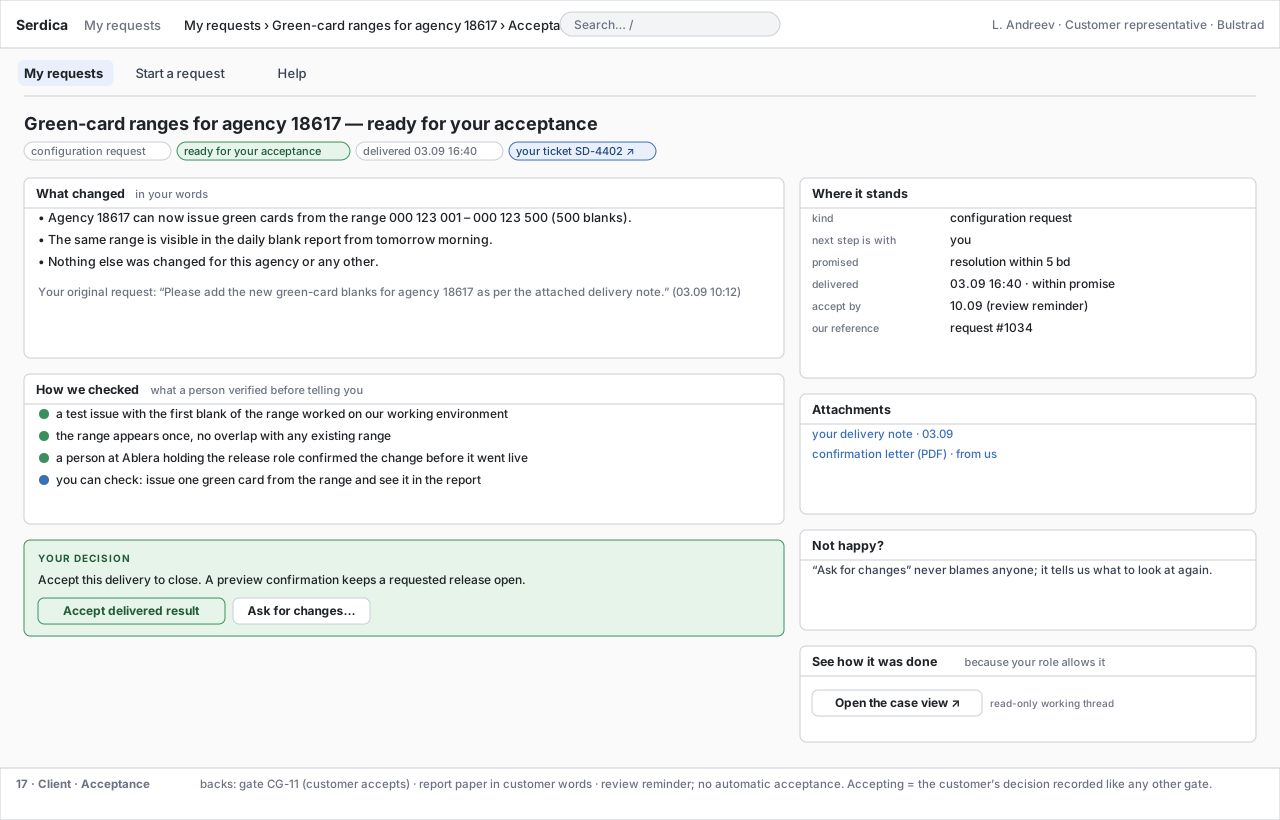
P The customer is not a second class of operator; they see a different application built from the same case (D91). Four screens; What you may start is a panel of screen 18 (D91):
| # | Screen | Renders | Backed by | The customer's job here |
|---|---|---|---|---|
| 15 | My requests | every request of theirs with the state in their words (received · we are looking into it · we need something from you · being fixed · checking the fix · ready for your acceptance · done), last update, their ticket, whose turn it is | CASES ⋈ GATES ⋈ the contract's clocks, filtered to the customer |
see whether anything waits on them |
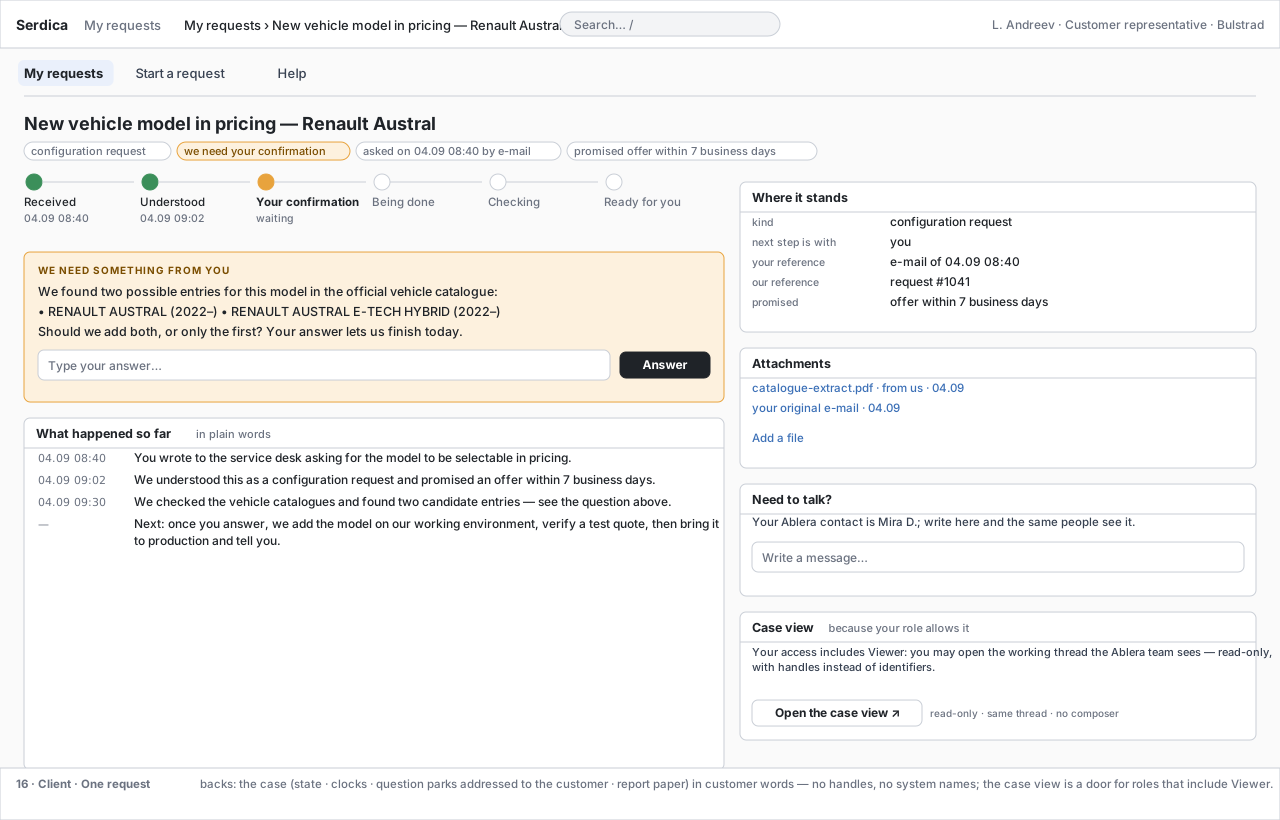
| 16 | One request | a plain-words timeline (received → understood → your confirmation → being done → checking → ready), the one open question with an answer box, where it stands, attachments, a message box to the same people; Open the case view when the person's role set includes Viewer | the case's statement — drafted and gated — never its papers; question parks addressed to the customer; the case view is the operator thread, read-only |
answer what only they can answer; open the working thread if their role allows |
| 17 | Acceptance | what changed in their words, how a person checked it, the decision (Accept approves the shown scope; delivery acceptance closes when all requested work is verified; Ask for changes reopens affected work), the accept-by date; See how it was done → the case view when the role allows | GATES H1/H3 for assigned business confirmation or CG-11 for acceptance, the artefact hash, the report paper |
accept, or ask for changes with a reason |
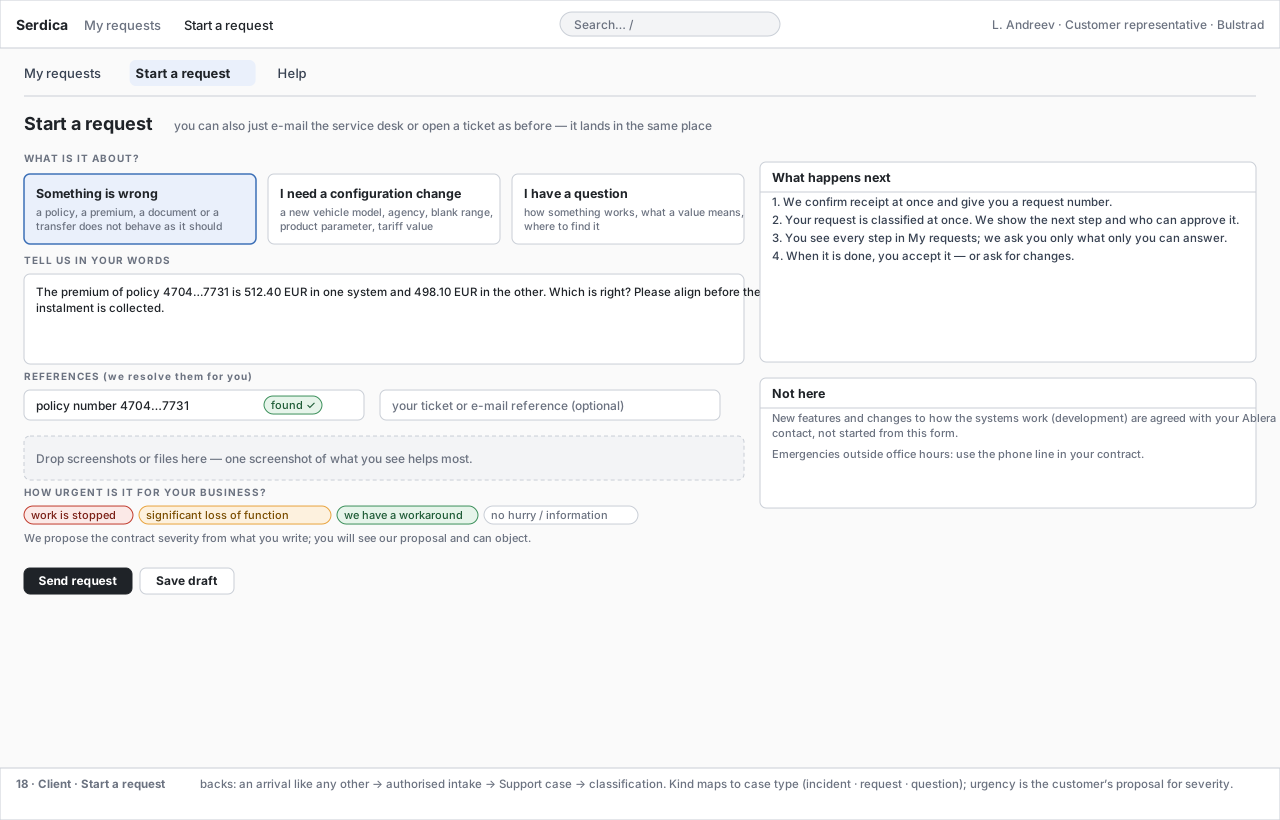
| 18 | Start a request | the kind (something is wrong · a configuration change · a question), their words, references we resolve for them, attachments, urgency as their proposal for severity; what happens next; what is not started here — target state (D81) | the intake contract, the same one a connector fills; intake.initiation |
begin work, send it for their organisation's approval, or understand a refusal |
P Three fields the client surface carries that a channel cannot (D97). Origin — every request shows whether it arrived by mail, from the ticket system, from the customer's help desk, or was started in place; one case model, four doors, and the list reads the same whichever was used. Modules involved — the parts of the platform a request actually engaged, so a support case that grew a configuration sub-case says so instead of going quiet. Initiator — who started it and when, because a client who starts work is a different fact from a client who was written to.
P Screen 18 shows the initial client entitlement, so the wireframe fixes all three outcomes rather than the happy one: granted opens the case, may request opens an authorisation request that parks visibly, not granted refuses with the clause and keeps the description for the commercial counterpart (Agents § 5c, Trust and Data § 3b). The kind list offers only what this role may start or request, and a refusal is shown with its reason — never hidden, never silently re-routed to a module the person happens to be allowed to start.
P Screen 18 is the target state and is not the first build (D81, formerly non-goal N-9). What is excluded is building a self-service form before the operator surface and the gate protocol exist, because a form over gates no work type has earned puts a customer in front of an untrained system. The wireframe exists now so that the intake contract is designed for rather than discovered.
P What is deliberately absent from every client screen, and why the absence is a design rule and not an omission:
| Absent | Why |
|---|---|
| the transcript | the operator surface shows plans, tool calls and stated reasoning; a customer reads the case's statement. Working papers are not customer-visible output. A representative whose role set includes Viewer may open the case view from a request — that is the operator thread, read-only, behind the role check; the client screens themselves never embed it |
| table names, environments, agent names, handles | customer-visible text is written in the register's language (Stage Application and Verification); a screen that leaks a schema has leaked the estate. The backs: lines in the footers of the wireframes are design annotations, not rendered text (#54) |
| any gate an operator owns | approval is a permission, not a second person (Trust and Data § 3); the only gate here is the acceptance the representative owns |
| anything that widens a role | nothing on a client screen grants, escalates or re-identifies — re-identification is an operator action and it is audited (Trust and Data § 4) |
| cost, budget, model, provider, kill switch, estate | none of it is the customer's business, and none of it is a measure of the work (D79, D117) |
P The Customer representative role may start support, may request configuration, may not start the Development module (id source), and views and accepts through CG-11 (D97). Acceptance records the person's name and the artefact hash; a later change re-opens the acceptance rather than reusing it.
6. The screens, drawn
P Every screen below is a schematic wireframe — it fixes the shell, the regions, the vocabulary and the data each one renders, not the styling, which follows serdica-ui's administration shell (PG-26). The sample case is generic on purpose: a premium that differs between the two systems for one policy, a vehicle model missing in pricing, a transfer that fails for an annex — the screens are not built around any one of them. Sample people are named (Ablera operators, customer contacts) because a wireframe needs to show who waits on whom; they are illustrations, not role assignments (D107, D110). Click any of them to enlarge. The full annotated sets, with the data source under every screen, are the operator wireframes and the client wireframes.
Work — Inbox and Cases
Decide — Decisions and the packet
Build — Studio and Knowledge
Observe and Control
The client surface
7. Rules the screens enforce
P Approval is a permission, not a second person (Trust and Data § 3). A decision card the viewer may decide shows the decision actions; one they may not shows who can, and a notify action. An Operator who holds the role for the gate and the target decides their own case in one action; where the organisation wants four eyes on a target it withholds the role from its operators — a role-set choice, not a platform rule. Nothing on screen lets a viewer widen their own role.
P Many viewers, one controller (Agent Runtime). The case header always shows the controller and the viewer count; Hand over is a recorded handover; Take over needs the operator role and notifies the previous controller. Viewers have no composer.
P The thread shows stated reasoning, not chain-of-thought — each agent's declared reasoning for a step, its tool calls and their result summaries, and every memory read and write (Architecture § 1). Raw model reasoning is neither a dependable API nor appropriate operational output.
P Every decision card is a packet, not a chat — the mechanism (with the verifier's verdict), the kind and the rejected alternatives, the exact change with expected counts, the revert path and effect classes, the replay, what remains uncertain (Stage Solution Take § 3). Approving binds a grant to the shown artefact hash; a changed artefact re-opens the gate. Result rows never appear in a card or a paper.
P Every card says where. A card without a where-chip is a defect of the card, not a style choice; the Where rail is derived from the cards, never typed.
P A brief before a case. No raw arrival reaches a person; the brief names its source and the Operator's one action is the H1 decision (SG-11).
P Held batches are cases so that their age is visible on the first screen — the direct answer to the 12-week HDesk plateau (Baseline § 5). They appear in Cases and in Decisions alike.
P Hours only. Human minutes, elapsed time, budgets in minutes, clocks in hours and business days; no currency on any screen (D117).
8. Realtime and auth
F SignalR is the estate's proven realtime transport — hub + one-use Redis ticket + HMAC group alias + Rabbit fan-out + transactional outbox, working tested code on the health path (verified 01.09.2026, Platform Details PG-5). P The case chat subscribes per case/session with its own ticket shape and role set; the list screens poll or subscribe to the workflow-generic change event. Authentication is Authority; the roles are the six LT_USER_ROLES rows, issued as role claims by Authority (Trust and Data § 3, D134).
Challenges
- P Visual design follows serdica-ui's administration look; the wireframes fix shell, regions, vocabulary and data, not styling — settled with the T1 skeleton.
- P Thread volume — a configuration stage runs for hours and produces thousands of events; the chat needs collapse-by-agent and follow-mode, and the SignalR payload must stay a reference to ledger rows, not the rows. Tool cards carry summaries; results stay one click deeper.
- P Where-chip resolution — a handle that does not resolve (a policy number with a typo, an object in an environment the connector cannot reach) must render as a red not found chip and park the brief as
question, never as a silent blank. - P The curator duty is a duty of the Operator role per branch of the tree, not a seventh role, until the measured proposal throughput (Metrics) says otherwise.
- P Control's policy tables render the catalogue rows
retention.per_class,gates.auto_confirm,gates.escalation_intervalsandbudget.*(Whitelabel Catalogue § 5; D109 / D112 / D117); what stays open is where the T1 skeleton fixes their storage.
P Implementation alignment. Intake, classification and routing follow Agents § 5c. A permitted arrival opens before an operator clicks it; Inbox is an inspection/correction queue. Gate commands carry the shown artefact hash and expected version; stale decisions return conflict. The same Acceptance screen states preview or delivery, target and revision; preview acceptance cannot close outstanding deployment. Reconnection reloads committed resources by ledger cursor. The backend enforces customer/role filtering on every read and command.
P Client-led Configuration. Reuse the existing request/Acceptance card for H1 business scope and H3 business results when CASE_TYPES.GATE_PLAN assigns required_role=customer_representative. It shows the business projection and exact revision, never a technical SQL packet. The same card uses CG-11 for preview/delivery. Each command names the gate id, scope, hash and version. Scope/result/preview confirmation continues work; only completed-delivery acceptance closes the case. This removes a vendor queue without adding a screen or implying write authority.